
Claude Code for Business Owners: Automate Your Business Without a Dev Team
Quick Answer
Claude Code is a terminal-based AI tool from Anthropic that understands your entire codebase and can build, edit, and deploy software autonomously. Unlike chatbots that generate code snippets, Claude Code operates as an agentic system — it plans multi-step approaches, reads and writes files, runs tests, and handles git workflows through natural language commands. Business owners use it to build internal tools, automate workflows, and create client-facing applications without hiring a development team. The learning curve is real but manageable: most business owners produce their first working tool within a weekend.
Key Answers
- What is Claude Code?
- Claude Code is Anthropic's agentic coding tool that lives in your terminal. It reads your codebase, understands the relationships between files, and executes multi-step development tasks through natural language. It can create, edit, test, and deploy complete applications autonomously.
- Can business owners actually use Claude Code without coding experience?
- Yes, with realistic expectations. Claude Code handles the coding; you provide the business requirements. You describe what you want in plain English, review the output, and guide refinements. The skill is knowing what to ask for, not how to code — which is exactly what business owners are good at.
- How much does Claude Code cost?
- Claude Code requires a Claude Pro subscription ($20/month) or API access. API usage costs vary: Claude Sonnet 4.6 (the default model) costs $3 per million input tokens and $15 per million output tokens. A typical small project consumes $5-30 in API costs. Enterprise-grade projects can reach $100-500 per month.
- What can a business owner realistically build with Claude Code?
- Internal dashboards, customer portals, data processing pipelines, content management systems, booking systems, invoice processors, and integration layers between existing tools. Claude Code excels at building the custom applications that would otherwise require a developer or agency.
Key Takeaways
- Claude Code works as an agentic system that autonomously plans, codes, tests, and deploys — not just a code autocomplete tool.
- Anthropic's own marketing team built agentic workflows that would normally require dedicated engineers, including ad creative generation and Figma automation.
- The CLAUDE.md file is your most powerful tool — it acts as persistent memory that tells Claude Code your project conventions, architecture, and rules across sessions.
- Business owners should start with a simple internal tool (dashboard, form, or report) before attempting client-facing applications.
- Claude Code is the build tool. When you need something beyond what you can describe, that is when you hire a professional developer to take over the codebase Claude Code started.
What Is Claude Code and Why Should Business Owners Care?
Claude Code is an agentic coding tool from Anthropic that lives in your terminal, understands your entire codebase, and builds software through natural language commands. It is not a chatbot that generates code snippets for you to copy and paste. Claude Code reads your project files, plans multi-step development tasks, writes and edits code across multiple files simultaneously, runs tests, handles git workflows, and deploys applications — all autonomously.
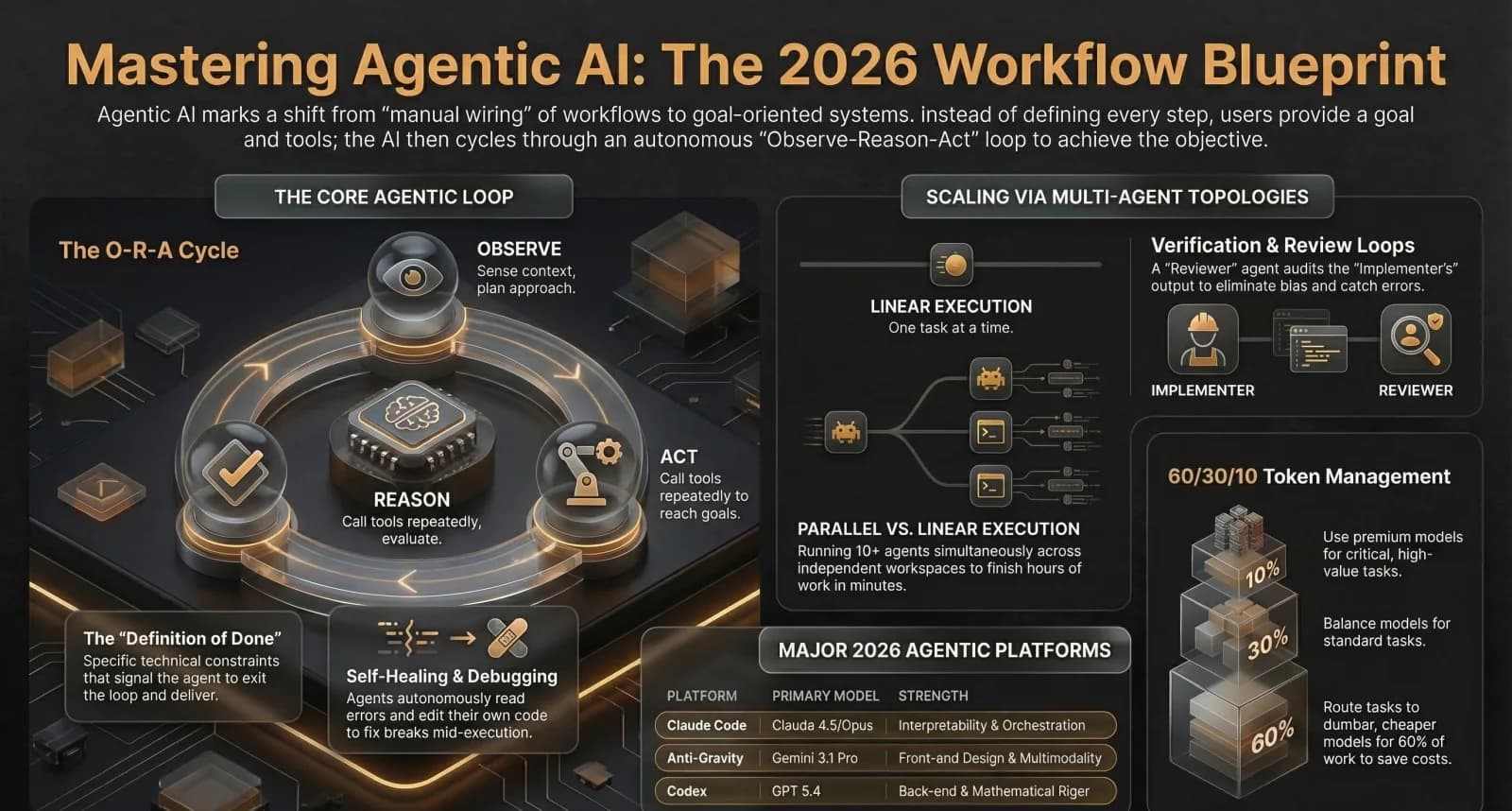
The word "agentic" matters here. Claude Code operates through a loop: gather context, take action, verify results. It does not just predict the next line of code — it reasons about what your project needs, makes changes, checks whether those changes work, and iterates until the task is complete. Andrew Ng launched a dedicated course on Claude Code describing it as highly agentic coding where AI works autonomously for many minutes or longer, not just completing code snippets.
For business owners, this changes the economics of software development. Tasks that previously required a developer for days or weeks — building an internal dashboard, creating a customer portal, automating a data pipeline — can now be completed by describing what you need in plain English. Nate Herk, whose AI automation tutorials have reached over 300,000 viewers, says he would teach a 10-year-old to build agentic workflows with Claude Code. The skill is knowing what to build, not how to code.
How Does Claude Code Work Without a Dev Team?
Claude Code works through three phases. First, it gathers context — reading your project files, understanding the architecture, and identifying relevant code. Second, it takes action — writing new code, editing existing files, running terminal commands, and installing dependencies. Third, it verifies results — running tests, checking build output, and confirming the changes work as intended. This loop repeats until the task is complete.
The most powerful feature for business owners is the CLAUDE.md file. This is a markdown file in your project root that acts as persistent memory across sessions. You write your project conventions, business rules, preferred technologies, and deployment instructions in CLAUDE.md, and Claude Code follows them every time. It is like giving a new contractor a detailed brief — except this contractor never forgets and never deviates from your instructions.
Anthropic's own marketing team demonstrated the real-world power of this approach. They built agentic workflows that would normally require dedicated engineers — including automated ad creative generation, a Figma plugin for mass creative production, and a Meta Ads MCP server. These are not toy projects — they are production tools that replaced manual processes within Anthropic itself.
What Can Business Owners Realistically Build With Claude Code?
The most successful business owner projects fall into four categories. Internal tools: dashboards that pull data from multiple sources into one view, inventory trackers, approval workflows, and team scheduling systems. Customer-facing portals: booking systems, client portals with document sharing, and status tracking pages. Data automation: pipelines that extract data from emails, PDFs, or spreadsheets and push it into your CRM, accounting software, or database. Integration layers: custom connectors between tools that do not natively talk to each other.
The realistic scope for a business owner working alone with Claude Code is a single-purpose application that serves one clear need. A property manager who builds a tenant communication portal. A consultant who builds an automated report generator. A retail business that builds a custom inventory system. These projects typically take a weekend to build an MVP and a few more sessions to refine.
Where business owners consistently struggle is multi-user applications with authentication, payment processing, and production-grade security. These are the projects where vibe coding reaches its limits and professional development becomes necessary. Claude Code can build the prototype, but a developer should review and harden anything that handles sensitive data or processes money.
How Much Does Claude Code Cost?
Claude Code requires either a Claude Pro subscription at $20 per month (which includes generous usage) or direct API access where you pay per token. API pricing for Claude Sonnet 4.6 — the default model — is $3 per million input tokens and $15 per million output tokens. For Claude Opus 4.6 — the most capable model — pricing is $15 per million input tokens and $75 per million output tokens.
In practical terms, building a simple internal tool consumes $5-30 in API costs. A more complex project over several sessions might reach $50-100. Enterprise-grade projects with large codebases can reach $100-500 per month. Compared to hiring a developer at $100-200 per hour or an agency at $15,000-50,000 per project, Claude Code is dramatically cheaper for appropriate use cases — understanding that the trade-off is your time providing direction and reviewing output.
What Are the Limitations Business Owners Should Know?
Claude Code has four limitations that matter for business owners. First, context window: Claude Code can hold a large amount of project context, but very large codebases (100,000+ lines) can exceed its working memory. The solution is breaking work into focused sessions with clear CLAUDE.md instructions. Second, non-determinism: the same prompt can produce slightly different results each time. Always review output rather than blindly accepting changes.
Third, security awareness: Claude Code writes functional code, but it does not automatically implement security best practices like input validation, SQL injection prevention, or rate limiting. Any application that handles user data or faces the internet needs security review by a professional. Fourth, deployment complexity: Claude Code can build the application, but deploying it to production (configuring servers, domains, SSL certificates, monitoring) still requires technical knowledge or a hosting platform like Vercel that abstracts deployment.
What Is the Bottom Line?
Claude Code is the most accessible path for business owners to build custom software without a dev team. It handles the coding; you provide the business knowledge and direction. Start with a simple internal tool — a dashboard, form, or automated report — and build your confidence before attempting anything client-facing. Use CLAUDE.md to maintain project context across sessions. Accept that Claude Code produces 80% of what you need and the last 20% requires iteration and refinement. For production applications that handle sensitive data or payments, bring in a professional developer to review and harden the codebase. Claude Code is not a replacement for developers — it is a tool that makes every business owner a little more technical and every developer dramatically more productive.
Research Data
Key strategies and factors based on original research
| feature | what it does | business use case | difficulty level (beginner/intermediate/advanced) | example command or workflow |
|---|---|---|---|---|
| Agentic Loop | A three-phase cycle (gather context, take action, verify results) that adapts based on previous steps to chain dozens of actions and course-correct autonomously. | Reducing rework and unclear requirements (addressing up to \sim30% lost engineering time) by allowing the system to handle debugging and refinement cycles. | Intermediate | Claude searches for a bug in src/auth/, reads files, applies edits, runs tests to verify the fix, and adjusts if tests fail. |
| MCP Integrations | A protocol that allows agents to connect to external tools, databases, and services (like Firecrawl or Google Maps) using pre-wrapped and documented servers. | Automating lead generation or data extraction by giving agents access to live web data and specialized tools without manual API wiring. | Intermediate | claude mcp add firecrawl --key <API_KEY> |
| Stochastic Multi-Agent Consensus | Spawns multiple agents with slight framing variations to exploit statistical randomness (stochasticity) and aggregate a diverse spread of ideas. | Strategic decision-making, product ideation, or research where identifying outliers and consensus points increases confidence in high-stakes decisions. | Advanced | Spawn 10 agents to independently analyze a Tik Tok growth problem and return a consensus report on hooks and device fingerprinting. |
| Subagent Verification Loops | Uses a fresh agent with zero context to review the output of an implementer agent to catch errors hidden by sunk cost bias or context pollution. | Code auditing and security reviews where unbiased peer review ensures high-quality production releases and minimizes logic errors. | Advanced | Agent A writes a rate limiter; Agent B (fresh context) reviews it; Agent C (resolver) fixes identified issues. |
| Plan Mode | Restricts Claude to read-only tools to analyze a project and propose an architecture or series of steps before editing files. | Safe exploration of complex legacy codebases without risk of accidental file corruption or breaking production systems. | Beginner | Shift+Tab to cycle to Plan Mode; then: Read src/auth/ and create a plan for adding OAuth support. |
| Video-to-Action Pipeline | Enables agents to learn procedures by watching YouTube videos (via Gemini API frame analysis) and converting them into executable instructions. | Rapidly training agents on visual-heavy tasks like 3D design in Blender or building complex N8N workflows from video tutorials. | Advanced | Feed a URL to a lead scraping tutorial; agent extracts steps and controls a browser to replicate the build. |
| Agent Chat Rooms | Assigns agents different personas (e.g., system thinker, contrarian) and has them debate a problem to sharpen ideas and find edge cases. | High-quality project planning and risk assessment where conflicting perspectives improve the final strategy or architectural design. | Advanced | Spawn 5 instances (Systems Thinker, Pragmatist, etc.) to debate why Instagram followers aren't converting to YouTube subs. |
| Prompt Contracts | Forces a formal agreement on goals, constraints, and failure conditions before the agent begins any non-trivial task. | Managing scope creep and preventing hallucinated solutions in freelance or enterprise software projects by defining done upfront. | Intermediate | Agent generates a contract: Goal: Marketing site; Constraint: <500 lines HTML; Failure: Looks like Bootstrap. |
| Self-Modifying System Prompts (CLAUDE.md / Memory) | Updates persistent markdown files with learned rules, preferences, and technical specs to prevent the agent from repeating past mistakes. | Institutional knowledge retention; ensuring long-term project alignment and reduced manual instruction overhead for growing teams. | Beginner | The agent appends a new rule to gemini.md: Never create applications in dark mode after a user correction. |
Original research by ManaTech
Frequently Asked Questions
Is Claude Code different from ChatGPT or regular Claude?
Yes. ChatGPT and Claude.ai generate code in a chat window that you manually copy and paste into files. Claude Code operates directly on your file system — it reads your entire project, writes changes to actual files, runs terminal commands, executes tests, and commits to git. It is the difference between getting a recipe and having a chef cook in your kitchen.
Do I need to install anything to use Claude Code?
You need Node.js (the JavaScript runtime) and a terminal application (Terminal on Mac, Command Prompt on Windows). Installation is a single command: npm install -g @anthropic-ai/claude-code. After authenticating with your Anthropic account, Claude Code is ready to use in any project directory.
Can Claude Code work with my existing software and tools?
Claude Code works with any codebase regardless of language or framework. It reads and understands JavaScript, TypeScript, Python, Ruby, Go, and most other languages. It can interact with APIs, databases, and external services through code it writes. If your tool has an API, Claude Code can integrate with it.
What happens when Claude Code makes a mistake?
Claude Code uses git to track all changes, so you can always revert. The best practice is to review changes before committing and to use Claude Code's built-in verification loop — it can run tests, check build output, and validate its own work. When something goes wrong, you describe the problem and Claude Code fixes it, often in one interaction.
Can Claude Code replace hiring a developer?
For simple internal tools and MVPs, yes. For production-grade applications that handle sensitive data, process payments, or serve thousands of users, no — you still need a professional developer for security review, performance optimisation, and architectural decisions. Claude Code is best understood as a force multiplier: it lets one developer do the work of five, or lets a non-developer build what previously required a developer.
Think You've Got It?
15 questions to test your understanding — instant feedback on every answer
Question 1 of 15
In the foundational 'core agent loop', which step involves the agent considering the context and the user's high-level goal to plan its next approach?
Question 2 of 15
What is the primary function of the 'definition of done' within an agentic workflow?
Question 3 of 15
When using the Claude Code platform, which specific file is prepended to the top of a conversation to store persistent project-specific instructions?
Question 4 of 15
How does 'stochastic multi-agent consensus' improve the quality of an agent's output?
Question 5 of 15
In the 'agent chat room' design pattern, what is the specific role of the 'Contrarian' agent?
Question 6 of 15
Why is a 'Reviewer' agent in a verification loop typically spawned with a fresh, empty context window?
Question 7 of 15
Which advanced prompting technique involves the agent asking the user several clarifying questions to surface non-obvious preferences before starting a task?
Question 8 of 15
What occurs during the 'compaction' process when an agent's context window fills up?
Question 9 of 15
According to the 'Iceberg Technique' of context management, what should be kept 'below the water' (not in the immediate prompt)?
Question 10 of 15
In the WAT framework used for building agentic workflows, what does the 'T' represent?
Question 11 of 15
The 'Model Context Protocol' (MCP) is best described as:
Question 12 of 15
Which model is specifically noted for its 'superior multimodal abilities', particularly its native understanding of video frames?
Question 13 of 15
In the 60/30/10 cost optimisation rule, what should the 60% segment typically consist of?
Question 14 of 15
Claude Code provides a safety feature called 'Checkpoints'. What do these allow a user to do?
Question 15 of 15
What is 'Plan Mode' in Claude Code used for?
Related Content
Building an AI Employee: Custom Applications That Replace Repetitive Tasks
How custom-built AI systems act as digital employees, handling meeting notes, inbox management, analytics, and onboarding so your team can focus on growth.
Read more →blogThe Rise of Agentic Development: How AI Agents Are Replacing Development Teams
The shift from writing code to orchestrating AI agents is redefining software development. What agentic development means for project timelines, costs, and the SMBs who need custom software.
Read more →blogWhy Vibe Coding Is Not Enough for Business-Critical Software
Vibe coding tools make software development accessible to everyone. But security vulnerabilities, context rot, and deployment complexity mean business-critical apps still need professional architecture.
Read more →blogChatGPT vs Claude vs Gemini for Small Business in 2026: A Practical Comparison
Most small business owners pick the first AI tool they try and stick with it. That is the most expensive mistake you can make in 2026. The three leading platforms — ChatGPT, Claude, and Gemini — are not interchangeable. Each one wins decisively for different tasks, and 70% of growing service firms now run all three concurrently for that exact reason.
Read more →blogWhat Is MCP (Model Context Protocol) and How Can It Transform Your Business?
Model Context Protocol (MCP) is the open standard that lets AI assistants connect to your business tools — databases, CRMs, file systems, and APIs — without custom integration code. With 18,000+ MCP servers available and backing from Anthropic, OpenAI, Google, and Microsoft, MCP is becoming the USB-C of AI.
Read more →Want to explore this topic further?
Book a free discovery call to discuss how ManaTech can help your business implement these ideas.
Book a Discovery Call