
Building an AI Employee: Custom Applications That Replace Repetitive Tasks
Quick Answer
An AI employee is a custom-built system that uses specialised sub-agents to handle multi-step workflows across your entire business stack, including meeting intelligence, inbox management, analytics reporting, and client onboarding. It costs a fraction of a full-time hire and typically pays for itself within 2-3 months.
Key Answers
- What is an AI employee?
- An AI employee is a custom-built system that operates across your entire business stack, handling tasks like meeting notes, inbox management, analytics, and onboarding that would otherwise require a dedicated hire.
- How much does a custom AI employee cost?
- A custom AI employee costs a fraction of the $55,000-$75,000 annual salary for an operations coordinator. Most deployments pay for themselves within 2-3 months through recovered team capacity.
- How long does it take to build an AI employee?
- A typical Phase 1 deployment covers 2-3 sub-agents and takes 4-6 weeks from kickoff to production, with each sub-agent tested against real workflows before going live.
- Should I build or buy an AI assistant?
- Off-the-shelf AI assistants handle generic tasks but cannot be customised. Custom AI employees are built around your exact processes and integrate with your specific tool stack for significantly more value.
Key Takeaways
- AI employees use a sub-agent architecture where each agent has isolated context and a specific role, preventing context contamination between functions like email, meetings, and analytics.
- A custom AI employee saves 20+ hours per week at a blended rate of $50/hour, recovering $4,000/month in team capacity and paying for itself within 2-3 months.
- Voice mode and Slack integration enable hands-free operation, allowing teams to interact with their AI employee through natural speech and existing communication channels.
- Custom AI employees outperform off-the-shelf tools like Microsoft Copilot because they integrate across your specific tool stack and follow your unique business processes.
- A typical Phase 1 deployment covers 2-3 sub-agents and takes 4-6 weeks from kickoff to production, with human-in-the-loop checkpoints for high-stakes decisions.

What Is an AI Employee?
An AI employee is a custom-built system that operates across your entire business stack, handling multi-step workflows like meeting notes, inbox triage, analytics reporting, and client onboarding that would otherwise require a dedicated hire.
An AI employee is not a chatbot on your website. It is a custom-built system that operates across your entire business stack. It handles tasks that would otherwise require a dedicated hire. Think of it as a digital team member. It processes meeting recordings into structured notes and action items. It triages your inbox and drafts responses based on context. It compiles analytics from multiple platforms into weekly reports. It runs client onboarding workflows from first contact to project kickoff. Unlike a SaaS tool that handles one function, an AI employee integrates across your CRM, email, project management, and communication tools. It executes multi-step workflows end-to-end. It learns your preferences, follows your processes, and operates 24/7 without breaks or benefits.
Why Do SMBs Need an AI Employee Now?
SMBs doing $500k to $5M annually have outgrown the founder-does-everything stage but cannot afford specialists for every function. AI employee costs have dropped 90% since early 2024, making custom builds viable for growing businesses.
Businesses doing $500k to $5M annually face a specific scaling problem. They have outgrown the founder-does-everything stage but cannot yet afford to hire specialists for every function. Hiring an operations coordinator costs $55,000-$75,000 per year in salary alone, plus benefits, training, and management overhead. An AI employee that handles the operational workload of that role costs a fraction to build and maintain. It consolidates several revenue-generating AI automations into a single system. The economics have shifted dramatically in the last 18 months. Foundation models from Anthropic, OpenAI, and Google are now capable enough to handle nuanced business tasks. The cost of API calls has dropped 90% since early 2024. What required a six-figure enterprise AI budget two years ago can now be built for a growing SMB at a price point that pays for itself within the first quarter.
How Does the Sub-Agent Architecture Behind an AI Employee Work?
The architecture uses specialised sub-agents, each with isolated context and a specific role. One handles meeting intelligence, another manages your inbox, and a third compiles analytics. This prevents context contamination between functions.
The architecture behind an AI employee uses specialised sub-agents. Each has isolated context and a specific role. One sub-agent handles meeting intelligence: it processes recordings, extracts decisions and action items, and updates your project management tool. Another handles inbox management: it classifies incoming messages by urgency and topic, drafts responses matching your communication style, and flags items requiring personal attention. A third handles analytics: it pulls data from Google Analytics, your CRM, and financial platforms, then generates reports with trend analysis. Voice mode enables hands-free operation. Instead of typing instructions, you speak naturally and the system processes your requests. Slack integration means the AI employee posts updates, summaries, and alerts directly into your team channels. The sub-agent architecture is critical because it prevents context contamination. Your meeting agent does not need access to financial data. Your analytics agent does not need your email history.
What Are the 4 Things Your AI Employee Can Handle Today?
An AI employee can handle meeting intelligence, inbox management, weekly business reviews, and prospect research today. It processes 80-90% of routine emails and prepares sales briefings before your first call.
First, meeting intelligence. Your AI employee joins calls via integration with Zoom or Google Meet. It transcribes the conversation, identifies action items, assigns them to the right people in your project management tool, and sends a summary to the relevant Slack channel. Second, inbox management. It processes 80-90% of routine emails automatically, drafting responses for your review and routing complex items to the right team member. Third, weekly business reviews. Every Monday morning, a compiled report covering revenue metrics, pipeline status, project delivery progress, and upcoming deadlines lands in your inbox without anyone lifting a finger. Fourth, prospect research. When a new lead enters your CRM, the AI employee researches the company, identifies relevant pain points, and prepares a briefing document before your first sales call.
Should You Build or Buy an AI Employee?
Off-the-shelf AI assistants deploy faster but are limited in capability. Custom AI employees cost more upfront but integrate with your specific tool stack and follow your exact business processes for significantly greater value.
Off-the-shelf AI assistants like Microsoft Copilot and Google Gemini for Workspace handle generic tasks well. But they operate within their own ecosystem boundaries. They cannot be customised to your specific workflows. A custom AI employee is built around your exact processes. It integrates with your specific tool stack and follows your business rules. The trade-off is clear. Off-the-shelf is faster to deploy but limited in capability. Custom requires upfront investment but delivers a system that fits your business precisely. For businesses with unique workflows, proprietary data, or multi-system processes, custom wins every time. The ROI calculation is straightforward. If the AI employee saves your team 20+ hours per week at a blended rate of $50/hour, that is $4,000/month in recovered capacity. Most custom builds pay for themselves within 2-3 months.
What Is the Bottom Line?
A custom AI employee saves 20+ hours per week, pays for itself within 2-3 months, and scales with your business through a modular sub-agent architecture.
We build AI employees using a modular sub-agent architecture that starts small and scales with your business. The process begins with a workflow audit. We map every repetitive task across your operation and quantify the time and cost of each. Each documented process becomes an AI skill replacing an SOP. Then we prioritise by ROI, building the highest-impact sub-agents first. A typical Phase 1 deployment covers 2-3 sub-agents and takes 4-6 weeks from kickoff to production. Each sub-agent is tested against your real workflows before going live. We build in human-in-the-loop checkpoints for any high-stakes decisions. The result is not a science project. It is a production system that your team relies on daily, with monitoring, error handling, and continuous improvement built in from the start.
Research Data
Key strategies and factors based on original research
| Feature/Mechanism | Description | Business Use Case | Implementation Method | Tool/Integration Type | Target Outcome |
|---|---|---|---|---|---|
| Claude Code | A terminal-based agent framework that orchestrates AI agents to manage business tasks and entire company operations. | Running automated AI teams, managing context windows, and eliminating siloed manual chat sessions. | Installation via terminal or Visual Studio Code extension; requires Claude subscription or Anthropic API authentication. | Terminal-based AI Agent Framework | High business leverage, automated operations, and elimination of manual orchestration. |
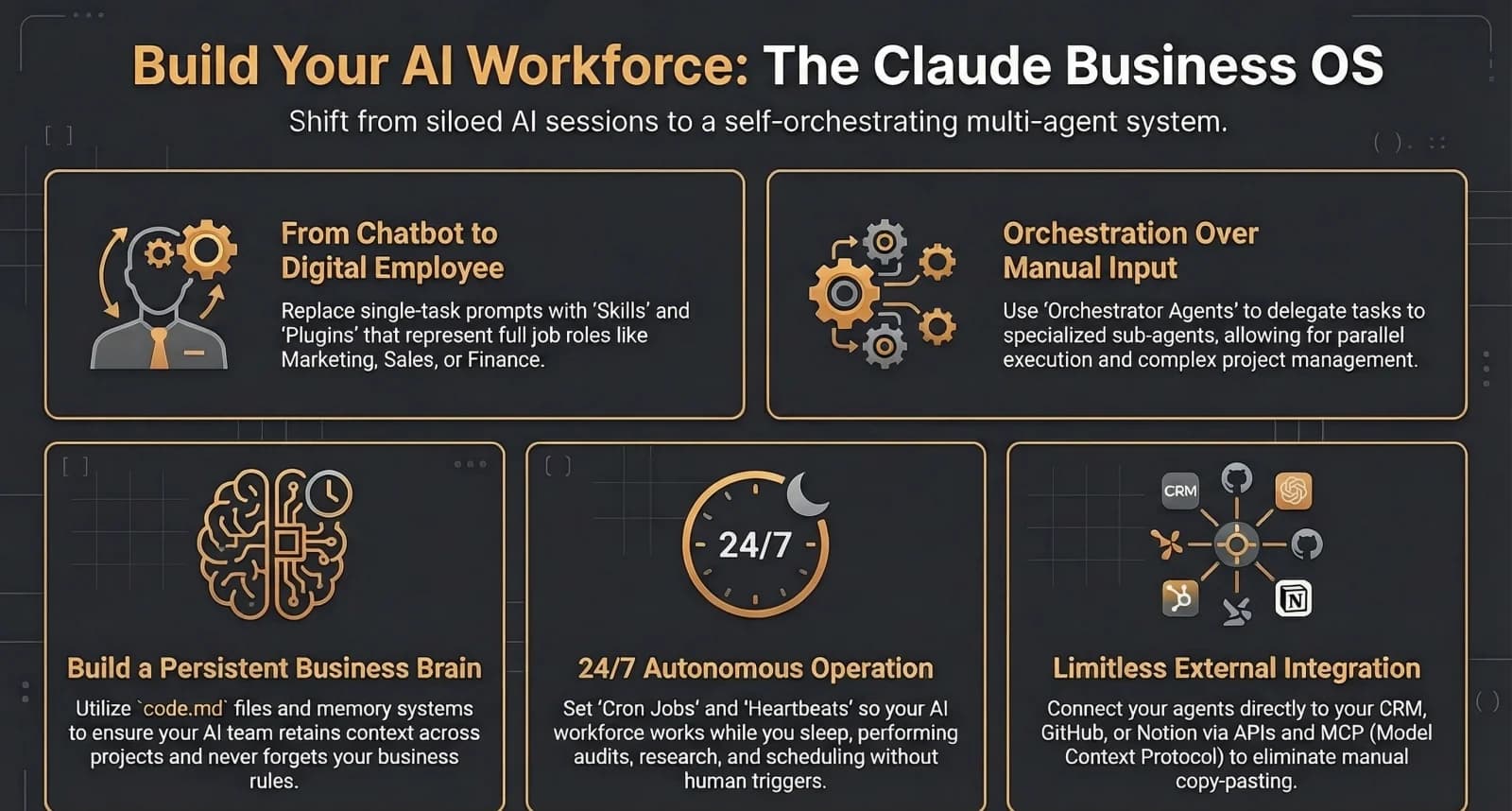
| Sub-agents | Specialized AI workers with isolated 200,000 token context windows for parallel task management. | Handling complex tasks across departments (e.g., HR, Content) without polluting the primary context window. | Created via the /agents command or by defining specific roles and missions in .md files. | Autonomous AI Agents | Parallel task execution, specialized expertise, and faster workflow completion via self-orchestration. |
| Skills | Reusable workflows or Standard Operating Procedures (SOPs) triggered automatically by the AI. | Enforcing standardized business processes, such as project creation or document branding, across multiple projects. | Defined in skill.md files; utilizes 'progressive disclosure' to read only necessary logic components. | Automated SOP / Workflow Package | Context window efficiency, consistent process execution, and sharable business logic. |
| Plugins | Bundled collections of multiple skills, tools, and connectors representing complete organizational functions. | Deploying 'AI employees' for specialized roles like Marketing, Finance, or Legal with ready-to-use toolsets. | Installed via marketplaces or custom-built by providing role descriptions and specific tool access. | AI Employee / Job Role Bundle | Full job role automation, cross-tool functionality, and ready-to-use departmental scaling. |
| Model Context Protocol (MCP) | An open standard facilitating secure communication between AI agents and external tools or services. | Connecting AI workforces to external tools like Playwright for browser automation or database servers. | Installed via the /mcp command and configured using the standardized MCP server protocol. | Standardized Integration Protocol | Standardized tool discovery, reduced integration friction, and secure external tool access. |
| CLAUDE.md | A persistent markdown file acting as a 'business brain' or system prompt for specific project directories. | Providing persistent memory and project-specific instructions to maintain context without repetitive re-explanation. | Creating a .md file within the project folder following a hierarchical directory structure. | Configuration / Persistent Memory File | Persistent project context, automated instruction loading, and compounding project knowledge. |
| Plan Mode | A read-only 'architect' state where the AI develops a strategy before performing any task execution. | Reviewing complex business strategies or technical plans to ensure alignment and safety before execution. | Activated via interface shortcuts (e.g., 'Shift+Tab'); generates a blueprint for user approval. | Strategy / Governance Feature | Operational safety, structured project management, and improved decision clarity. |
| Cron Jobs / Heartbeat | Scheduled triggers and periodic check-in mechanisms for autonomous agent activities. | Automating daily news digests (e.g., at 8:00 AM) or periodically scanning inboxes for high-priority items. | Configured via terminal commands to execute specific tasks or scans at defined intervals. | Autonomous Scheduling Mechanism | 24/7 background operation, automated reporting, and optimized token costs via periodic scans. |
| Structured Logging | Custom logic for tracking AI operations, tool utilization, and overall strategic alignment. | Analyzing productivity patterns, identifying bottlenecks, and maintaining audit trails for compliance. | Integrated into the AI framework (e.g., 'Claude Code OS') to log activity across AI departments. | Analytics / Tracking System | Continuous improvement, productivity assessment, and strategic alignment of AI teams. |
| GitHub Integration | Version control system integration for backing up AI configurations and project documentation. | Disaster recovery for AI workspace files and maintaining an audit history of AI system evolution. | Connecting to the GitHub CLI to automatically commit and push changes to remote repositories. | Backup / Version Control | Remote accessibility, version history safety, and collaborative human/AI development. |
Original research by ManaTech
Frequently Asked Questions
What is the difference between an AI employee and a chatbot?
A chatbot handles single-turn conversations on a website. An AI employee is a custom-built system that operates across your entire business stack, executing multi-step workflows like processing meeting recordings into action items, triaging your inbox, compiling analytics, and running client onboarding. It integrates with your CRM, email, project management, and communication tools.
How much does a custom AI employee cost compared to hiring?
An operations coordinator costs $55,000-$75,000 per year in salary plus benefits and training. A custom AI employee that handles equivalent operational workload costs a fraction to build and maintain, with most deployments paying for themselves within 2-3 months through recovered team capacity of 20+ hours per week.
Is an AI employee secure for handling business data?
Custom AI employees use a sub-agent architecture where each agent has isolated context and access only to the data it needs. Your meeting agent does not access financial data, and your analytics agent does not access email history. Human-in-the-loop checkpoints are built in for any high-stakes decisions.
How long does it take to build an AI employee?
A typical Phase 1 deployment covers 2-3 sub-agents and takes 4-6 weeks from kickoff to production. The process starts with a workflow audit to map every repetitive task, then prioritises by ROI so the highest-impact sub-agents are built first. Each sub-agent is tested against real workflows before going live.
Should I build a custom AI employee or use Microsoft Copilot?
Off-the-shelf AI assistants like Microsoft Copilot handle generic tasks well but operate within their own ecosystem boundaries and cannot be customised to your specific workflows. For businesses with unique workflows, proprietary data, or multi-system processes, a custom AI employee built around your exact processes delivers significantly more value.
Think You've Got It?
10 questions to test your understanding — instant feedback on every answer
Question 1 of 10
In the context of Claude Code, what is the primary purpose of the `claude.md` file found within a project folder?
Question 2 of 10
According to the source material, what is the fundamental difference between a Claude Skill and a Claude Plugin?
Question 3 of 10
What is the Model Context Protocol (MCP) as described in the tutorials?
Question 4 of 10
Which file has the highest priority when Claude Code determines which configuration settings to apply to a project?
Question 5 of 10
Liam Ottley describes three pillars of a successful AI workforce. Which of the following correctly identifies these pillars?
Question 6 of 10
In the OpenClaude architecture, how does a 'Heartbeat' differ from a 'Cron job'?
Question 7 of 10
What is the primary advantage of the 'Plan Mode' in Claude Code?
Question 8 of 10
When building a tool in Relevance AI, what does the 'Invent' feature allow a user to do?
Question 9 of 10
What is 'Progressive Disclosure' in the context of Claude Skills?
Question 10 of 10
According to the 'Master OpenClaude' tutorial, what is the role of the 'PI Agent'?
Related Content
The Rise of Agentic Development: How AI Agents Are Replacing Development Teams
The shift from writing code to orchestrating AI agents is redefining software development. What agentic development means for project timelines, costs, and the SMBs who need custom software.
Read more →blogWhy Vibe Coding Is Not Enough for Business-Critical Software
Vibe coding tools make software development accessible to everyone. But security vulnerabilities, context rot, and deployment complexity mean business-critical apps still need professional architecture.
Read more →blogClaude Code for Business Owners: Automate Your Business Without a Dev Team
Claude Code is an agentic coding tool that works autonomously for minutes or hours, not just completing code snippets. Nate Herk says he would teach a 10-year-old to build agentic workflows with it. Here is what business owners need to know.
Read more →blogWhen Should You Outgrow Zapier and Build a Custom Automation System?
Zapier is the right tool until it is not. When your automation bill exceeds $500-1,000 per month, workflows break at critical moments, or you need logic that a visual builder cannot express, it is time to consider a custom automation system. One company went from $600 per month on Zapier to $75 per month with a custom build.
Read more →blogGoogle AntiGravity: What It Means for Small Businesses
Google AntiGravity lets you build apps by describing what you want. Here is what it actually means for your business and where the limits are.
Read more →Want to explore this topic further?
Book a free discovery call to discuss how ManaTech can help your business implement these ideas.
Book a Discovery Call