
n8n for Beginners: The Complete Guide to Workflow Automation
Quick Answer
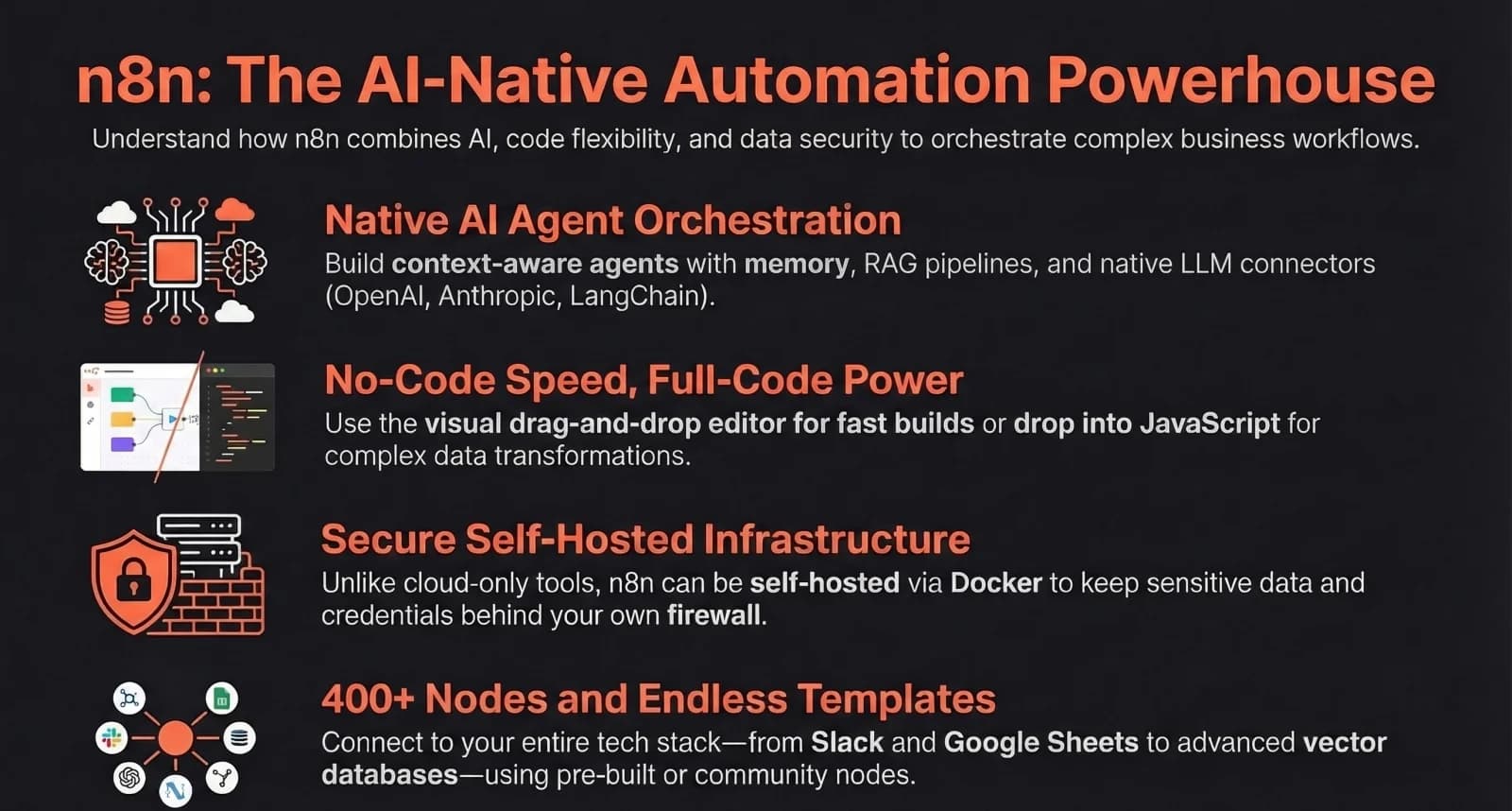
n8n is an open-source, visual workflow automation platform that connects 1,300+ apps with a drag-and-drop node-based editor. Unlike Zapier, n8n charges per workflow execution rather than per step, making it dramatically cheaper for complex multi-step automations. It offers 70 dedicated AI nodes including LangChain integration, and can be self-hosted for free or used as a managed cloud service starting at $24 per month.
Key Answers
- What is n8n?
- n8n is an open-source, visual workflow automation platform with 1,300+ native integrations that lets you build complex automations using a drag-and-drop node-based editor, with full code capability when needed.
- How much does n8n cost?
- n8n is free to self-host with unlimited executions. Cloud plans start at $24 per month for 2,500 executions. All plans include unlimited users, unlimited workflows, and 400+ integrations.
- How is n8n different from Zapier?
- n8n charges per workflow execution regardless of steps, while Zapier charges per task at each step. A 10-step workflow costs 1 execution in n8n but 10 tasks in Zapier, making n8n dramatically cheaper at scale.
- Can n8n build AI-powered automations?
- Yes. n8n has 70 dedicated AI nodes including native LangChain integration and vector database support. 75% of n8n customers already use the AI features to build intelligent workflows.
- Should beginners self-host or use n8n Cloud?
- Beginners should start with n8n Cloud at $24 per month to learn the platform without managing infrastructure. Self-hosting is best for teams with DevOps experience who need full data sovereignty.
Key Takeaways
- n8n has 230,000 active users, 3,000+ enterprise customers, $40 million ARR, and a $2.5 billion valuation as of late 2025, growing 5-10x year over year.
- n8n charges per workflow execution, not per step. A 10-step workflow processing 100 items in a loop costs 1 execution in n8n but could cost 1,000 tasks in Zapier, making n8n dramatically cheaper for complex automations.
- With 70 dedicated AI nodes including native LangChain integration, n8n is the most advanced AI-native automation platform. 75% of customers already use its AI capabilities.
- n8n can be self-hosted for free on your own infrastructure using Docker, giving you unlimited executions, full data sovereignty, and zero recurring software costs.
- The platform supports full JavaScript and Python code within workflows, bridging the gap between no-code visual automation and custom development.
What Is n8n and Why Is It Growing So Fast?
n8n is an open-source workflow automation platform with 230,000 active users, $40 million ARR, and a $2.5 billion valuation. It connects 1,300+ apps through a visual drag-and-drop editor.
n8n started in Berlin in 2019 as an open-source alternative to Zapier. By 2025 it had 230,000 active users, 3,000 enterprise customers including Vodafone, Delivery Hero, and Microsoft, and a $2.5 billion valuation after raising $180 million in Series C funding. Its GitHub repository has 70,000+ stars, placing it in the top 150 projects of all time. The growth is driven by three things: a fundamentally different pricing model that is dramatically cheaper for complex workflows, the most advanced AI capabilities of any automation platform, and the option to self-host for free. For businesses looking to build revenue-generating AI automations, n8n provides the infrastructure to build automations that would cost tens of thousands in custom development.
How Does n8n Compare to Zapier and Make.com?
n8n charges per workflow execution regardless of steps, while Zapier charges per step and Make.com charges per operation. A 10-step workflow costs 1 execution in n8n but 10 tasks in Zapier.
The pricing model is the most important difference. In Zapier, each action step in a workflow counts as one task. A workflow with 10 steps that processes 100 items costs 1,000 tasks. In n8n, that same workflow costs 1 execution. At scale, this difference is enormous. Zapier starts at $29.99 per month for 750 tasks. n8n Cloud starts at $24 per month for 2,500 executions. And the free self-hosted option gives you unlimited executions. On features, Zapier has the largest integration library at 8,000+ apps but handles complex logic poorly. Make.com sits in the middle with a visual canvas and 3,000+ integrations. n8n has 1,300+ native integrations plus 2,900+ community-built nodes, and excels at complex branching, loops, sub-workflows, and full code capability. If your workflows are simple A-to-B connections, Zapier is easiest. If they involve complex logic, AI, or cost sensitivity, n8n wins.
What Can You Build With n8n as a Small Business?
Common n8n use cases include lead management and CRM sync, customer support automation, e-commerce order processing, AI-powered email summarisation, automated reporting, and content marketing pipelines.
Lead management is one of the highest-ROI use cases. Capture leads from web forms, social ads, or email, automatically classify them by source and intent, push them into your CRM, and trigger instant follow-up emails or WhatsApp messages. One retailer using n8n reduced order fulfillment processing from 4 hours per day to 30 minutes. AI-powered workflows are where n8n truly differentiates. Build agents that summarise incoming emails, classify support tickets by urgency, extract data from documents, or generate weekly reports pulling from multiple business tools. With 70 AI nodes and native LangChain integration, these capabilities are accessible without custom code. Every repeatable business process is a candidate for n8n automation, from financial reconciliation to HR onboarding to marketing content scheduling.
Should You Self-Host n8n or Use the Cloud?
Beginners should start with n8n Cloud at $24 per month. Self-hosting is free but requires DevOps knowledge and costs $20-40 per month in infrastructure. Choose self-hosting for data sovereignty or unlimited executions.
n8n Cloud is a managed service. You sign up, build workflows, and n8n handles servers, updates, and security. The Starter plan at $24 per month includes 2,500 executions, unlimited users, and unlimited workflows. Self-hosting uses Docker to run n8n on your own server. The software is free under a fair-code license. But "free" is misleading. You need a server ($20-40 per month for adequate resources), a PostgreSQL database, and someone to handle updates, backups, and security. Realistically, total cost is $200-500 per month when factoring in developer time. Start with Cloud. Move to self-hosting later if you need unlimited executions, full data sovereignty, or integration with systems that cannot leave your network. The 14-day free trial on Cloud requires no credit card.
What Are the 5 Mistakes Every n8n Beginner Makes?
The five most common mistakes are building overly complex workflows too fast, ignoring error handling, hardcoding values, poor workflow organisation, and skipping the official beginner course.
First, building too complex too fast. Start with 3 nodes: a trigger, an action, and an output. Add complexity only after the basics work. Second, ignoring error handling. Add an Error Trigger node to every workflow from the start. Set up Slack or email alerts for failures. When a workflow breaks silently at 2am, you will be glad you did. Third, hardcoding URLs, API keys, and IDs directly into nodes. Use environment variables instead. Fourth, poor organisation. Name your workflows clearly using a convention like "[Sales] Lead to CRM sync" and organise them into folders by department. Fifth, skipping the official n8n Beginner Course. It is free, covers all 9 core concepts, and takes a few hours. Random YouTube tutorials build on these foundations, so learning them first saves you hours of confusion later.
What Is the Bottom Line?
n8n is the most powerful and cost-effective automation platform for businesses that need complex, AI-powered workflows. Start with Cloud, learn with the free beginner course, and build your first automation today.
n8n is not the simplest automation tool. Zapier is easier. But n8n is the most powerful, the most cost-effective at scale, and the most capable for AI-powered workflows. If your automations involve more than basic A-to-B connections, n8n should be on your shortlist. Start with n8n Cloud, complete the official beginner course, and build one workflow that addresses your biggest operational pain point. Most businesses find that their first automation pays for itself within the first week. At ManaTech, we use n8n as part of our automation stack to build AI employees and intelligent workflows for clients who need custom solutions that go beyond what any off-the-shelf platform can deliver.
Research Data
Key strategies and factors based on original research
| Tier or Edition | Key Features | Pricing | Integrations & Nodes | Deployment & Hosting Options | Target Audience |
|---|---|---|---|---|---|
| Cloud | Fully managed hosting, AI Assistant, automated backups and upgrades, manual/scheduled/webhook triggers, and binary data handling. | Starts at $24/month (Starter) or $60/month (Pro). Free trial includes OpenAI credits. | 400+ modular nodes (e.g., Slack, WhatsApp, OpenAI, Postgres), Webhook node, HTTP Request node, and AI Agent builder. | Managed hosting in EU or US regions provided by n8n. | Startups, solo builders, and teams requiring a no-maintenance solution without DevOps support. |
| Self-hosted (Community) | Fair-code licensed, full data control, custom JavaScript (Function nodes), local binary data storage, and support for community nodes. | Free (Community Edition). | 400+ core nodes, community-built nodes, custom node SDK, local file system access, and SSH node. | Local or cloud-based via npm, Docker, Kubernetes, VPS (Hostinger, DigitalOcean), Raspberry Pi, AWS, Azure, or GCP. | Developers, technical teams, and privacy-focused users with infrastructure management skills. |
| Enterprise | Role-Based Access Control (RBAC), SSO user provisioning (SAML/LDAP/OIDC), log streaming, Git source control, and external secrets management (Vaults). | Not in source | All core nodes plus advanced governance tools, custom private plugins, and internal API wrappers. | Self-hosted behind firewalls, private clouds, air-gapped environments, or Kubernetes for production scale. | Large organizations (Fintech, Healthcare, Legal) with high security and compliance (HIPAA/GDPR/SOC2) needs. |
Original research by ManaTech
Frequently Asked Questions
What is n8n and who is it for?
n8n is a visual workflow automation platform that lets you connect apps and build automations using a drag-and-drop editor. It is designed for technical teams, agencies, and growing businesses that need complex multi-step automations with branching logic, loops, and custom code, which simpler tools like Zapier cannot handle well.
How much does n8n cost compared to Zapier?
n8n Cloud starts at $24 per month for 2,500 executions with unlimited users and workflows. Zapier starts at $29.99 per month for 750 tasks. The critical difference is pricing model: n8n charges per workflow run regardless of steps, while Zapier charges per task at each step. For complex workflows, n8n is 5-10x cheaper.
Can I self-host n8n for free?
Yes. n8n Community Edition is free to self-host with unlimited executions and workflows. You deploy it using Docker on your own server. While the software is free, expect infrastructure costs of $20-40 per month for server hosting and database, plus the time investment of managing and updating the system.
What AI features does n8n have?
n8n has 70 dedicated AI nodes including native LangChain integration, vector database connectors, and chat model nodes for OpenAI, Claude, and Gemini. You can build AI agents that classify support tickets, summarise emails, extract data from documents, or generate content, all within a visual workflow without writing code.
What are the most common n8n beginner mistakes?
The biggest mistakes are building overly complex workflows before mastering basics, ignoring error handling until workflows break in production, hardcoding values instead of using environment variables, and skipping the official n8n Beginner Course. Start with 3-node workflows and add complexity only after each part works.
Think You've Got It?
10 questions to test your understanding — instant feedback on every answer
Question 1 of 10
What is the primary visual indicator in the n8n editor that a node is a 'Trigger' node?
Question 2 of 10
According to the NetworkChuck source, which node is used as the 'simplest, most elegant' way to connect n8n to an AI terminal tool like Claude Code?
Question 3 of 10
In the context of n8n AI Agents, what are the three essential components that define the node's 'brain' and capabilities?
Question 4 of 10
When using Claude Code in a terminal, which flag is used to enable 'headless mode' for automated responses in n8n?
Question 5 of 10
What is the primary difference between 'Simple Memory' and 'Vector Store' (RAG) memory in an n8n AI workflow?
Question 6 of 10
When configuring a node, what does toggling a field to 'Expression' allow the user to do?
Question 7 of 10
In the Zero-to-Hero course, why is a 'Wait' node often used in a loop with an 'If' node when calling external AI APIs like Firecrawl or Waypeed?
Question 8 of 10
What is a major benefit of using 'Execute Sub-workflow' nodes in a complex automation system?
Question 9 of 10
Which of the following data representations is the 'underlying' format n8n uses to pass data between nodes?
Question 10 of 10
To allow n8n to send emails via Gmail or access Google Drive files, what must a user first create in the Google Cloud Console?
Related Content
Your Website Is Invisible to AI Search — Here Is How to Fix It
AI search engines like ChatGPT, Perplexity, and Gemini cannot read most business websites. If your site relies on client-side JavaScript rendering, you are invisible to the fastest-growing traffic source on the web.
Read more →blogAI Search Sends Businesses 10x More Revenue Per Click
AI-driven traffic accounts for less than 1% of visits but generates up to 11.4% of revenue. The data shows that every AI click is worth dramatically more than a traditional search click.
Read more →blogHow to Get Your Business Cited by ChatGPT
AI citations are the new backlinks. Branded web mentions correlate more strongly with AI visibility than traditional SEO signals. Here are 7 practical steps to get your business into AI answers.
Read more →Want to explore this topic further?
Book a free discovery call to discuss how ManaTech can help your business implement these ideas.
Book a Discovery Call