
Make.com for Beginners: The Complete Guide to No-Code Automation
Quick Answer
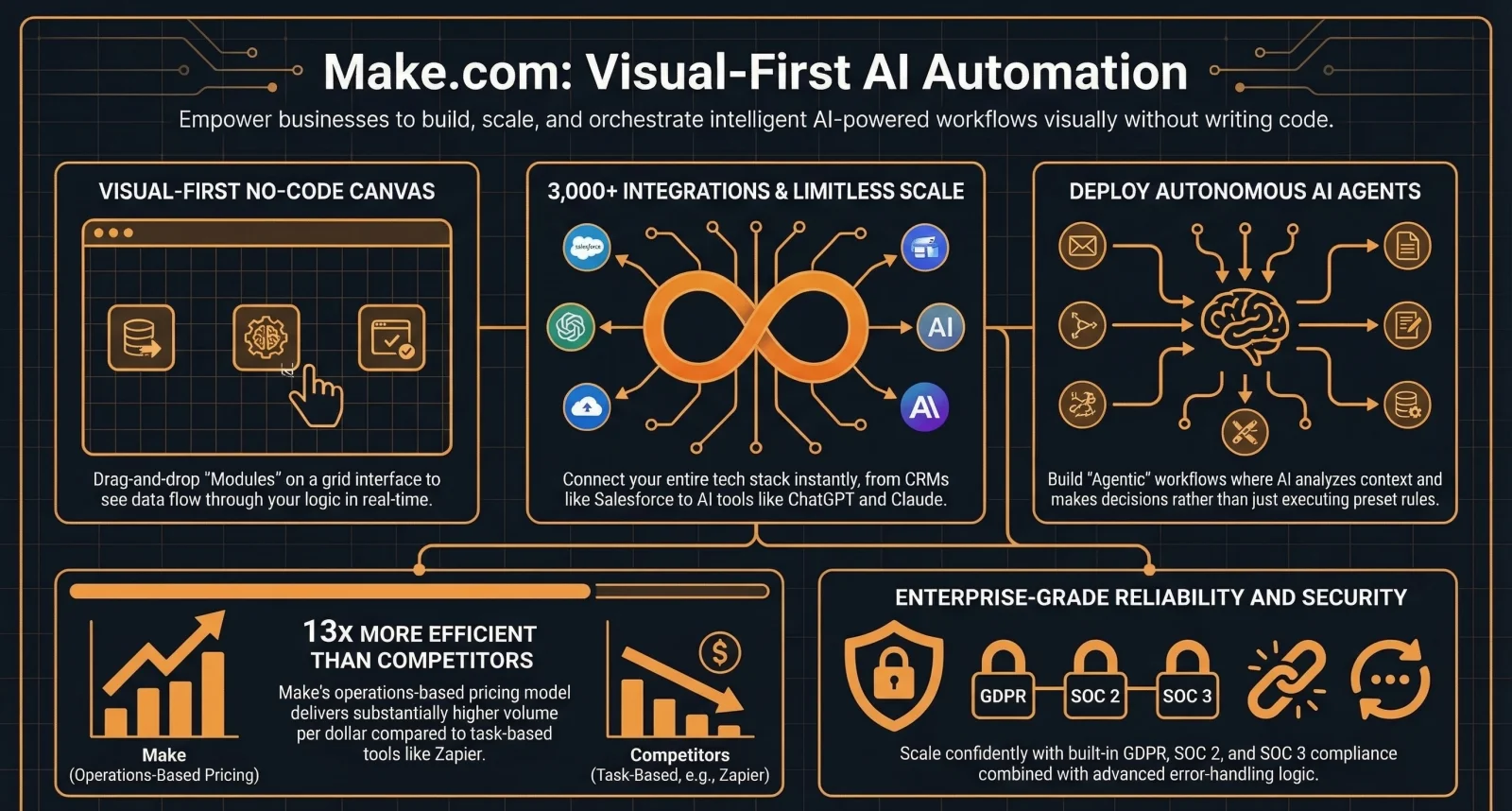
Make.com is a visual, no-code automation platform with 3,000+ app integrations that uses a drag-and-drop canvas interface to build complex workflows. Formerly known as Integromat, it sits between Zapier (simpler but more expensive at scale) and n8n (more powerful but requires technical skill). The free plan includes 1,000 credits per month and 2 active scenarios, while paid plans start at $10.59 per month.
Key Answers
- What is Make.com?
- Make.com is a no-code automation platform with 3,000+ integrations that uses a visual canvas interface to build workflows. Formerly Integromat, it is designed for non-technical teams that need complex branching logic.
- How much does Make.com cost?
- Make.com is free for 1,000 credits per month with 2 active scenarios. The Core plan starts at $10.59 per month with 10,000 credits, unlimited scenarios, and 1-minute scheduling intervals.
- How does Make.com compare to Zapier and n8n?
- Make.com is cheaper than Zapier for complex workflows and easier than n8n for non-developers. Its visual canvas handles branching and parallel paths better than Zapier but lacks n8n code capability and self-hosting.
- What are Make.com credits?
- Credits are the billing unit in Make.com. Each module execution in a scenario consumes credits. A scenario with 10 modules that runs once consumes 10 credits. Unused credits roll forward one month on paid plans.
- Can non-technical people use Make.com?
- Yes. Make.com is designed for non-developers. The visual canvas interface makes complex branching logic intuitive, and the Make Academy provides free structured courses to learn the platform from scratch.
Key Takeaways
- Make.com has $52.6 million in annual revenue, 3,000+ app integrations, and 478 employees, making it one of the three dominant workflow automation platforms alongside Zapier and n8n.
- The visual canvas interface lets non-technical users build complex workflows with branching, parallel paths, filters, and routers, which is impossible in Zapier linear "Zap" model.
- Make.com costs $10.59 per month for 10,000 credits compared to Zapier at $29.99 per month for 750 tasks, making it 3-5x cheaper for multi-step automations.
- Built-in data stores provide simple persistent storage within the platform, eliminating the need for external databases in many automation scenarios.
- AI Agents and LLM modules let you build no-code AI assistants directly within Make, connecting to OpenAI, Claude, and other models without writing code.

What Is Make.com and Who Is It For?
Make.com is a visual, no-code automation platform with 3,000+ app integrations designed for non-technical teams that need complex workflow logic. Formerly Integromat, it has $52.6 million in annual revenue.
Make.com started as Integromat in Prague in 2012 and rebranded in 2022. It sits at the sweet spot between Zapier and n8n. Zapier is the simplest automation tool but handles complex logic poorly and is the most expensive at scale. n8n is the most powerful but requires technical skill and is aimed at developers. Make.com gives non-technical teams the ability to build complex workflows with branching, parallel paths, and conditional logic using a visual canvas that feels intuitive. With 3,000+ integrations, $52.6 million in annual revenue, and 478 employees, it is not a startup experiment. AI automation is a revenue advantage for growing businesses, and Make.com makes it accessible without requiring a developer on staff.
How Does Make.com Compare to Zapier and n8n?
Make.com is 3-5x cheaper than Zapier for multi-step workflows and far more accessible than n8n for non-developers. Its visual canvas handles complex branching logic that Zapier cannot match.
Make.com costs $10.59 per month for 10,000 credits. Zapier costs $29.99 per month for 750 tasks. Both count each step as one unit, but Make gives you 13x more included units at a lower price. That alone makes Make.com significantly cheaper for any workflow with multiple steps. The visual canvas is the other key differentiator. Zapier uses a linear step-by-step model. Make.com uses a flowchart-style canvas where you can add routers for branching, filters for conditional logic, iterators for processing lists, and parallel execution paths. This makes workflows like "if lead score is above 80, route to sales and send a Slack notification, otherwise add to nurture sequence" easy to build visually. Compared to n8n which offers full code capability and self-hosting, Make.com is more accessible but less powerful. If your team includes developers, n8n is the stronger choice. If your team is non-technical, Make.com is ideal.
What Are the Best Make.com Use Cases for Small Businesses?
The highest-ROI use cases are automated lead routing, order processing, social media scheduling, client onboarding, reporting dashboards, and AI-powered customer support.
Lead capture and routing is the single highest-ROI automation for most SMBs. When a lead fills out a form, Make.com can instantly classify them by source, industry, and intent, push the record into your CRM, and trigger a personalised follow-up email. Research shows that responding to a lead within 60 seconds increases conversion rates by 391% compared to waiting 24 hours. Order processing automation is the second highest-impact use case. When an order arrives in Shopify or WooCommerce, Make.com can update inventory, generate a shipping label, send tracking information, create an invoice, and update your accounting software, all without anyone touching a keyboard. Businesses report reducing per-order processing from 15 minutes to under 1 minute. Other high-value use cases include social media content scheduling from a Google Sheet, automated client onboarding sequences triggered by payment, weekly KPI report generation, and AI-powered customer support using Make.com AI Agents.
How Do Make.com Credits Work and How Do You Avoid Overspending?
Each module execution in a scenario consumes one credit. A 10-module scenario running once uses 10 credits. Frequent scheduling and multi-step workflows consume credits faster than expected.
Make.com transitioned from "operations" to "credits" as its billing unit in late 2025. The mechanics are the same: each module that executes in a scenario consumes one credit. A scenario with 10 modules running once uses 10 credits. If that scenario runs every minute, it uses 14,400 credits per day. The Core plan includes 10,000 credits per month, so a single aggressively scheduled scenario could exhaust your monthly allocation in under 24 hours. To avoid overspending: first, schedule scenarios at the longest interval that still meets your business needs. Hourly checks are usually sufficient for most workflows. Second, deactivate test scenarios immediately after testing. Third, use filters early in your scenario to prevent downstream modules from executing unnecessarily. Fourth, use the built-in data stores for caching and deduplication instead of processing the same data repeatedly. Unused credits now roll forward one month on paid plans, so you have a small buffer.
What Are the 6 Mistakes Every Make.com Beginner Makes?
The most common mistakes are underestimating credit consumption, scheduling too frequently, keeping test scenarios active, ignoring error handling, building monolithic scenarios, and skipping the free Make Academy.
First, not understanding credit consumption. A 10-module scenario running every minute uses 14,400 credits per day. Plan your scheduling before activating. Second, scheduling too frequently. Every 15 minutes is usually sufficient for most business processes. Third, keeping test scenarios active after development. Deactivate everything that is not production-ready. Fourth, ignoring error handling. Add error routes to every scenario from the start. When a module fails due to an API timeout or rate limit, the error route catches it instead of breaking silently. Fifth, building one massive scenario instead of breaking it into smaller, modular scenarios that call each other. Smaller scenarios are easier to debug and maintain. Sixth, skipping the Make Academy. Make offers free structured courses that teach the platform systematically. Learning through trial and error wastes hours that proper documentation prevents.
What Is the Bottom Line?
Make.com is the best automation platform for non-technical teams that need complex workflows at a reasonable price. Start with the free plan, complete the Make Academy, and build one scenario that saves you time this week.
Make.com occupies the sweet spot in the automation market. It is significantly cheaper and more capable than Zapier for anything beyond simple automations. It is more accessible than n8n for non-technical teams. And with AI Agents and LLM modules now built in, it can handle increasingly intelligent workflows. Start with the free plan. Complete the Make Academy basics course. Build one scenario that automates your biggest time drain. Most businesses find their first automation pays for itself within a week. When your automation needs outgrow what Make.com can handle, that is when you evaluate building a custom AI employee. At ManaTech, we help businesses identify the right automation tools for their specific needs and build custom solutions when off-the-shelf platforms reach their limits.
Research Data
Key strategies and factors based on original research
| Pricing Tier | Monthly Cost (Billed Monthly) | Key Features | Integrations | Advanced Logic & AI Capabilities | Use Cases | Target Audience |
|---|---|---|---|---|---|---|
| Free | $0 | 1,000 monthly operations, 2 active scenarios, 15-minute minimum scheduling intervals, 5MB file size limit. | Access to 3,000+ apps including Google Sheets, Airtable, and Slack. | Visual scenario builder, native AI Agent modules (April 2025 launch), routers, filters, and sentiment analysis. | Simple task automation, learning the platform, lead generation testing. | Individuals, beginners, and those exploring automation. |
| Core | $9 | 10,000 operations/month, unlimited active scenarios, 1-minute scheduling intervals, API access. | 3,000+ pre-built apps, custom API connections via HTTP module. | Visual workflows, unlimited branching, AI-powered decision making. | Freelance workflows, simple business process automation, solopreneur operations. | Freelancers and solopreneurs. |
| Pro | $16 - $18 | 10,000 operations/month, priority scenario execution, custom variables, full-text execution log search. | Full access to app library plus custom LLM API keys for GPT-4 and Claude. | Credit-based system for AI modules (2025/2026), advanced error handling (break/ignore), and complex orchestration. | Content marketing automation, multi-step lead qualification, CRM synchronization. | Growing businesses and individuals with complex automation needs. |
| Teams | $29 | 10,000 operations/month, multi-user collaboration, team roles, shared scenario templates. | 3,000+ apps, enterprise-grade app connections. | Collaborative visual maps, high-frequency triggers, AI agents holding context across steps. | Marketing agency campaign scaling, cross-departmental operations, team-based project administration. | Small to medium-sized business (SMB) teams. |
| Enterprise | Custom Pricing | Unlimited scalability, 24/7 support, enhanced security, single sign-on (SSO), GDPR/SOC 2 compliance. | Full enterprise tech stack integration, custom systems, and on-prem agents. | Visual-first AI-powered enterprise automation, AI agents working alongside teams, complex decision logic. | Fintech KYC verification, large-scale content processing pipelines, global IT operations. | Large organizations and enterprises requiring high security and scale. |
Original research by ManaTech
Frequently Asked Questions
What is Make.com and how does it differ from Integromat?
Make.com is the rebranded version of Integromat. The company changed its name in early 2022 to better reflect its expanded capabilities. The platform remains the same visual automation builder with the same core technology, but has since added AI agents, expanded to 3,000+ integrations, and introduced a credit-based billing system.
How much does Make.com cost compared to Zapier?
Make.com starts at $10.59 per month for 10,000 credits with unlimited scenarios. Zapier starts at $29.99 per month for 750 tasks. Make.com counts each module execution as a credit while Zapier counts each step as a task. For a 5-step workflow running 100 times, Make.com uses 500 credits while Zapier uses 500 tasks, but Make gives you 13x more included units for a lower price.
What are the best Make.com use cases for small businesses?
The highest-ROI use cases are lead capture and CRM routing (reducing response time from 24 hours to under 60 seconds), order processing automation (reducing per-order time from 15 minutes to 1 minute), social media scheduling, client onboarding workflows, automated reporting, and AI-powered customer support. Most businesses see measurable time savings within the first week.
What is the difference between Make.com and n8n?
Make.com is designed for non-technical users with a visual drag-and-drop interface and 3,000+ integrations. n8n is designed for technical teams, offers self-hosting for free, has full code capability with JavaScript and Python, and charges per workflow execution rather than per step. Choose Make.com if your team is non-technical. Choose n8n if you need code flexibility, AI agents, or cost-effective high-volume automation.
What are the most common Make.com beginner mistakes?
The biggest mistakes are not understanding how credits are consumed (multi-step scenarios and frequent scheduling burn credits fast), keeping test scenarios active (wasting credits on non-production workflows), ignoring error handling, building monolithic scenarios instead of modular ones, and skipping the free Make Academy courses.
Think You've Got It?
12 questions to test your understanding — instant feedback on every answer
Question 1 of 12
What was the original name of the Make.com platform before its rebranding in 2022?
Question 2 of 12
In Make.com terminology, what is a 'Scenario'?
Question 3 of 12
What is the primary difference between a 'Polling' trigger and an 'Instant' trigger?
Question 4 of 12
Launched in April 2025, how do 'Make AI Agents' differ from traditional linear automations?
Question 5 of 12
If you need to process a list of items (an array) so that the subsequent modules run once for every item, which module should you use?
Question 6 of 12
As of 2025, what major change was introduced to Make's pricing model regarding AI modules?
Question 7 of 12
Which module is essential for handling 'flaky' APIs that might fail temporarily by allowing the system to retry the action later?
Question 8 of 12
When comparing Make to Zapier, what is cited as a significant advantage of using Make for complex workflows?
Question 9 of 12
What is the maximum duration a single 'Sleep' module can pause a scenario for in Make.com?
Question 10 of 12
Which tool would be most appropriate to use if you need to extract a specific YouTube Video ID from a full URL without using expensive AI tokens?
Question 11 of 12
True or False: The Free plan on Make.com allows you to have an unlimited number of active scenarios running at once.
Question 12 of 12
Which function would you use inside a module to remove all HTML tags from a piece of scraped text, leaving only the clean content?
Related Content
Your Website Is Invisible to AI Search — Here Is How to Fix It
AI search engines like ChatGPT, Perplexity, and Gemini cannot read most business websites. If your site relies on client-side JavaScript rendering, you are invisible to the fastest-growing traffic source on the web.
Read more →blogAI Search Sends Businesses 10x More Revenue Per Click
AI-driven traffic accounts for less than 1% of visits but generates up to 11.4% of revenue. The data shows that every AI click is worth dramatically more than a traditional search click.
Read more →blogHow to Get Your Business Cited by ChatGPT
AI citations are the new backlinks. Branded web mentions correlate more strongly with AI visibility than traditional SEO signals. Here are 7 practical steps to get your business into AI answers.
Read more →Want to explore this topic further?
Book a free discovery call to discuss how ManaTech can help your business implement these ideas.
Book a Discovery Call