
5 AI Quick Wins Any Business Can Implement This Quarter
Quick Answer
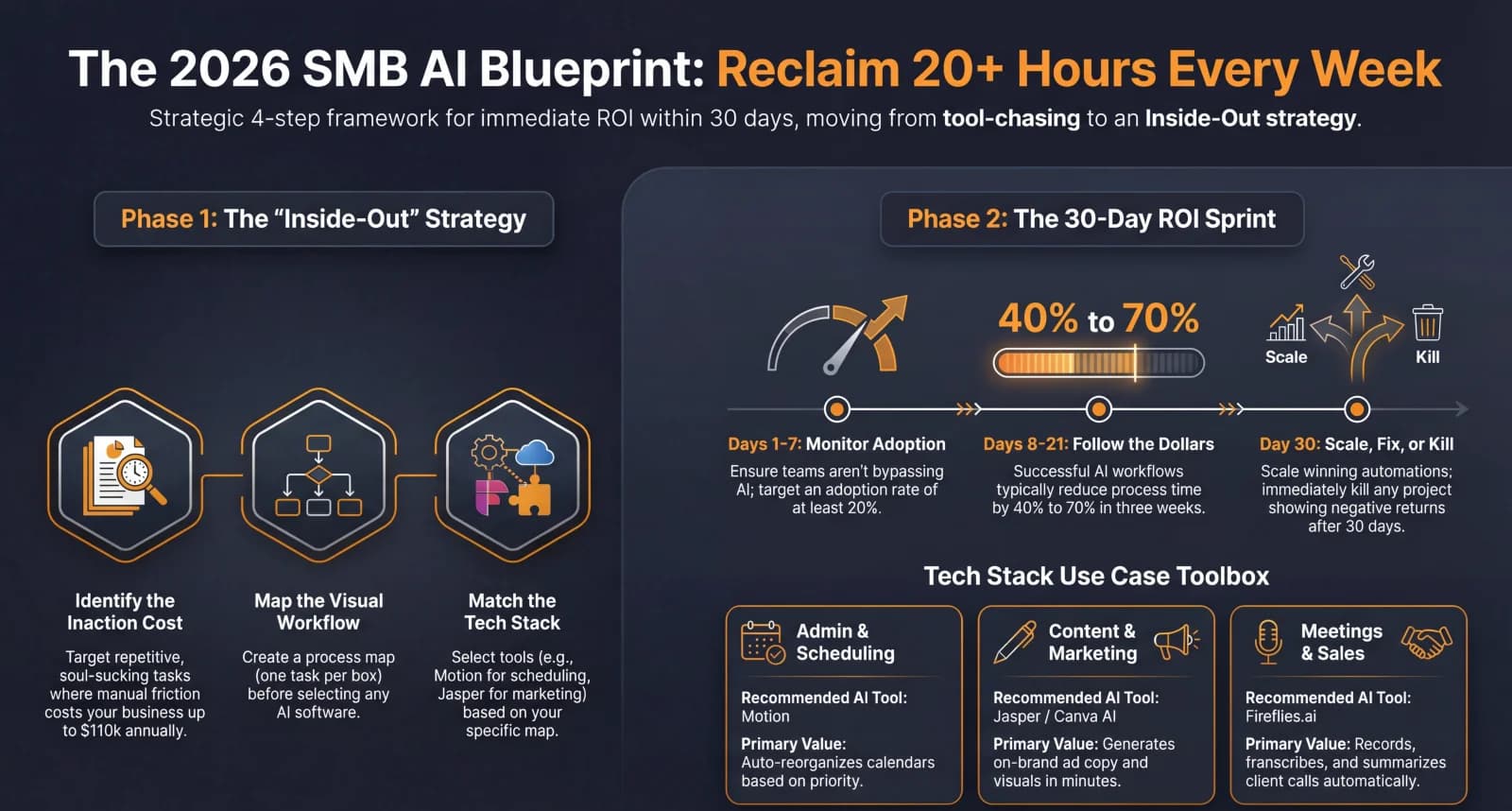
The fastest AI wins for any business are automating document processing (invoices, receipts, contracts), deploying an AI email assistant for drafting and triaging, using AI-powered meeting summaries to eliminate manual note-taking, building a custom internal knowledge base chatbot, and automating your reporting and data reconciliation. Each of these can be implemented in 1-2 weeks, costs under $100 per month, and typically saves 15-30 hours of manual labour every month.
Key Answers
- What is the easiest AI automation to implement first?
- AI email drafting and triage is the simplest starting point. Tools like Superhuman, Gemini in Google Workspace, and Microsoft Copilot integrate directly into existing email workflows with zero setup. Most businesses see a 45-minute daily time saving within the first week.
- How much does it cost to start using AI in a small business?
- A practical AI starter stack costs $50-150 per month. ChatGPT Plus costs $20/month, Notion AI adds $10/month per user, and a document processing tool like DocuWare or Nanonets starts at $30/month. Most businesses recoup this within 2 weeks through time savings alone.
- How quickly can a business see ROI from AI automation?
- Grant Thornton reports that businesses implementing targeted AI quick wins see measurable time savings within the first week and positive ROI within 30 days. Document processing automation alone cuts processing time by 35-45% and reduces errors by 60-75%.
- What AI automations save the most time for small businesses?
- Document processing and data reconciliation save the most time — an average of 25 hours per week across disconnected systems according to US Chamber of Commerce research. AI meeting summaries rank second, eliminating 5-8 hours per week of manual note-taking and follow-up creation.
Key Takeaways
- AI email assistants save an average of 45 minutes per day per employee — that is 15 hours per month recovered from drafting, triaging, and responding to routine messages.
- Document processing automation cuts processing time by 35-45% and reduces data entry errors by 60-75%, according to industry benchmarks from PrimeBPM and DocuWare.
- The average small business spends 25 hours per week reconciling data across disconnected platforms — a single AI-powered reporting tool can eliminate 80% of that manual work.
- A complete AI quick-wins starter stack costs $50-150 per month and typically pays for itself within the first 2-4 weeks through recovered employee hours.
- Meaningful AI adoption starts small — organisations that begin with 1-2 targeted quick wins achieve 40% better success rates than those attempting enterprise-wide rollouts.
Why Should You Start with AI Quick Wins?
Quick wins build confidence, prove ROI fast, and create momentum for larger AI projects. Organisations that start small achieve 40% better success rates than those attempting full-scale transformations.
The RAND Corporation found that more than 80% of AI initiatives fail to deliver intended value — usually because organisations apply technology without understanding which processes benefit most. The antidote is starting with targeted, low-risk automations that solve specific, measurable problems. When your team sees an AI tool save them 45 minutes every morning on email alone, the conversation shifts from "should we use AI?" to "what else can we automate?"
The key is choosing automations that deliver measurable results within 30 days. If you want a framework for quantifying the return, our guide to measuring AI ROI for specific business processes walks through the exact metrics to track.
Quick Win 1: How Can AI Handle Your Email Faster?
AI email assistants draft replies, prioritise your inbox, and summarise long threads — saving an average of 45 minutes per day per person. This is the single fastest AI win for any business.
Superhuman, Google Gemini in Gmail, and Microsoft Copilot in Outlook all offer built-in AI drafting. You do not need to install anything new — these features activate inside the email client you already use. Superhuman reports that its AI features save users 4 hours per week on average. Google Gemini drafts contextually aware replies by reading the full thread and matching your writing style. Microsoft Copilot summarises email chains and generates action items in a single click.
Implementation takes under 10 minutes. Enable the feature, spend one day using "suggest reply" on every email, and you will immediately see which responses you can accept as-is (typically 60-70%) and which need minor editing. Within a week, email becomes a 30-minute task instead of a 2-hour drain.
Quick Win 2: How Does AI Automate Document Processing?
AI document processing extracts data from invoices, receipts, contracts, and forms — cutting processing time by 35-45% and reducing errors by 60-75% compared to manual data entry.
A business processing 500 documents per month saves 25-40 hours monthly with AI extraction. Tools like Xero's built-in AI (for NZ businesses already on Xero), Nanonets, DocuWare, and Rossum handle the heavy lifting. They read scanned documents, extract key fields (amounts, dates, vendor names, line items), and push data directly into your accounting or ERP system.
The real value compounds when you stop manually reconciling data between disconnected tools. Our analysis of hidden SaaS costs beyond subscription fees found that businesses spend an average of 25 hours per week on data reconciliation alone. AI document processing eliminates the root cause.
Quick Win 3: Can AI Replace Manual Meeting Notes?
Yes. AI meeting tools record, transcribe, and summarise every meeting — then generate action items, decisions, and follow-up emails automatically. This saves 5-8 hours per week for teams that meet frequently.
Otter.ai, Fireflies.ai, and Fathom integrate directly with Zoom, Google Meet, and Microsoft Teams. They join your meeting as a silent participant, transcribe in real time, and produce a structured summary within minutes of the call ending. Fathom is free for individual use and generates summaries with highlighted action items. Otter.ai costs $16.99 per month and adds searchable transcripts across all your meetings.
The impact goes beyond saving time on note-taking. When every meeting has a searchable transcript and clear action items, accountability improves. Decisions are documented. Nothing falls through the cracks. For NZ businesses running client meetings across time zones, these tools also let absent team members catch up in 5 minutes instead of requesting a separate briefing.
Quick Win 4: How Do You Build an AI Knowledge Base for Your Team?
Upload your SOPs, policies, and process documents to an AI chatbot. Your team asks questions in plain English and gets instant, accurate answers — instead of searching through folders or asking the same person every time.
Notion AI, Slite, and Guru all offer AI-powered internal knowledge search. You upload or connect your existing documentation, and the AI indexes it for conversational queries. Instead of "Where is the refund policy?" your team asks the chatbot: "What is our process when a customer requests a refund after 30 days?" and gets the specific answer with a link to the source document.
This is especially valuable for growing teams. New hires get answers instantly instead of waiting for a colleague to be free. As we explored in our article on why AI skills are replacing traditional SOPs, static documents become outdated the moment they are written. An AI knowledge base stays current because it pulls from your live documentation.
Quick Win 5: How Can AI Automate Your Business Reporting?
AI reporting tools pull data from multiple sources, generate formatted reports, and highlight anomalies — turning a weekly 4-hour reporting grind into a 15-minute review.
Google Sheets with Gemini, Microsoft Excel with Copilot, and standalone tools like Julius AI and ChatGPT's data analysis mode can all analyse your business data conversationally. Upload a CSV of your sales data and ask "What were my top 5 products by margin last month?" or "Show me the trend in customer acquisition cost over the last 6 months." You get an answer with a chart in seconds — no formula writing, no pivot table wrangling.
For NZ businesses using Xero, the combination of Xero's built-in reporting plus an AI tool like ChatGPT for deeper analysis is powerful. Export your Xero profit and loss or aged receivables, feed it to an AI, and ask specific questions: "Which clients are consistently paying late?" or "What is my gross margin trend by quarter?" This turns financial data into actionable intelligence without hiring an analyst.
What Is the Best Order to Implement These Quick Wins?
Start with email and meeting summaries in week one, add document processing in week two, deploy your knowledge base in week three, and automate reporting in week four. This sequence builds momentum from the easiest wins first.
Week 1 wins (email + meetings) require zero setup cost, activate inside tools you already pay for, and create visible time savings on day one. This builds team buy-in. Week 2 (document processing) tackles your biggest time drain and often delivers the largest measurable ROI. Week 3 (knowledge base) compounds the value by reducing interruptions and onboarding time. Week 4 (reporting) connects everything — now you have better data flowing in, and AI helps you make sense of it faster.
Once all five are running, you will have recovered 15-30 hours per month and built the internal confidence to tackle revenue-generating AI automations that go beyond time savings and directly impact your top line.
What Is the Bottom Line?
You do not need a massive budget, a data team, or a year-long roadmap to start seeing value from AI. Five targeted automations — email, documents, meetings, knowledge, and reporting — can be running within a month for under $150/month and will save your team 15-30 hours every month. Start with one this week.
The businesses that win with AI in 2026 are not the ones with the biggest technology budgets. They are the ones that start. Pick one quick win from this list, implement it this week, measure the results for 30 days, and then add the next one. That is how practical AI adoption works — and it is exactly how ManaTech helps businesses move from manual chaos to automated clarity.
Research Data
Key strategies and factors based on original research
| category name | example tools | implementation time | estimated monthly cost | ROI timeline | difficulty level |
|---|---|---|---|---|---|
| Meeting Transcription & Summarization | Fireflies.ai, Tactiq, Gong AI | Plug-and-play / Quick setup | Free tiers available; Paid plans range $10-$50+ | Immediate (Hours saved weekly) | Low |
| Content Generation (Writing) | ChatGPT, Jasper, Copy.ai | Plug-and-play | Free to $20-$40 per month | Immediate | Low |
| AI Document Processing (OCR/IDP) | Kdan, Airtable AI, ChatGPT + Zapier | Requires setup (Mapping fields) | Free to $100 per month | Immediate (Reduces manual entry by 95%+) | Moderate |
| Lead Response & Management | Apollo.io, Drift, Lead Management AI | Requires setup and workflow integration | Free tiers to $500 per month | Fast (Prevents 400% drop in closing odds) | Moderate |
| Customer Service Chatbots | HubSpot Chatbot, Intercom Fin, Tidio | Requires setup (Training on FAQs/Docs) | Free to $120+ per month | 4-8 weeks (Measurable within 30 days) | Moderate |
| Workflow & Invoice Automation | Zapier AI, Make.com, Relay.app | Requires setup (Visual workflow building) | Free to $299 per month | 1-3 months (83% reduction in processing time) | Moderate |
| Inventory & Demand Forecasting | Shopify Inventory, Zoho Inventory | Requires setup (Data import/linking suppliers) | Free to $45-$299 per month | 1-3 months (Reduces stockouts by 60-70%) | Moderate |
| HR & Recruitment | Workable, HubSpot Recruiting, Bamboo HR | Requires setup (Pipeline configuration) | Free to $299 per month | 1-2 months (Cuts hiring time by 50%) | Moderate |
Original research by ManaTech
Frequently Asked Questions
Do I need technical skills to implement these AI quick wins?
No. Every automation in this guide uses tools with built-in AI that require no coding or technical setup. Most integrate directly into software you already use — Gmail, Outlook, Google Docs, Slack, or Microsoft Teams. The setup is typically a matter of enabling a feature or connecting an account, not building custom software.
Will AI replace my employees if I implement these automations?
These quick wins augment your team — they do not replace anyone. AI handles the repetitive, low-value tasks that your employees already dislike: data entry, meeting notes, inbox triage, report formatting. Your team gets time back to focus on the work that actually requires human judgment, creativity, and relationship-building.
What if my business handles sensitive data — is AI safe to use?
Enterprise-tier AI tools like Microsoft Copilot, Google Gemini for Workspace, and ChatGPT Enterprise do not train on your data and offer SOC 2 compliance, data encryption, and admin controls. For highly regulated industries (healthcare, finance, legal), ensure your chosen tools meet your specific compliance requirements — most major AI platforms now publish detailed data processing agreements.
How do I measure whether an AI quick win is actually working?
Track three metrics: hours saved per week (ask your team to log time before and after), error rate reduction (especially for document processing and data entry), and employee satisfaction scores. The simplest approach is a 30-day before-and-after comparison — measure the time a process takes manually for one week, implement the AI tool, then measure again after two weeks of use.
What should I implement after these five quick wins?
Once you have proven value with quick wins, the natural next step is connecting your tools into automated workflows. This means building custom integrations between your CRM, accounting software, and communication tools — typically where a custom-built solution from a partner like ManaTech delivers 10-50x the value of patching together another SaaS subscription.
Can these AI tools work with New Zealand-specific software like Xero?
Yes. Xero has its own AI features for invoice processing and bank reconciliation, and most AI automation platforms (Zapier, Make, n8n) have native Xero integrations. ChatGPT and Claude can also generate Xero-compatible CSV imports, custom report templates, and automated categorisation rules for NZ tax codes.
Think You've Got It?
10 questions to test your understanding — instant feedback on every answer
Question 1 of 10
In the context of small business operations, how does AI-powered automation primarily differ from traditional workflow automation?
Question 2 of 10
According to the 'Inside-Out' AI framework, what is the critical first step before selecting an AI tool?
Question 3 of 10
When calculating the Return on Investment (ROI) for manual knowledge work, what 'multiplier' is recommended to account for the total cost of friction?
Question 4 of 10
Which AI tool is specifically described as a calendar and task manager that automatically reorganises your schedule based on priorities and deadlines?
Question 5 of 10
What is 'GEO' (Generative Engine Optimisation) in the context of modern digital marketing?
Question 6 of 10
In the 30-day AI ROI framework, what should occur during the final phase (Days 22-30)?
Question 7 of 10
What common mistake often leads to small businesses having overlapping subscriptions and zero return on their AI investment?
Question 8 of 10
Research shows that failing to respond to a sales lead within 5 minutes results in what impact on closing odds?
Question 9 of 10
When creating a process map, which shape is traditionally used to represent a point where a decision must be made?
Question 10 of 10
How can AI-powered inventory automation help a retail business manage its cash flow?
Related Content
How to Measure the ROI of AI Automation in Your Business
AI automation delivers measurable returns in 90-180 days when scoped correctly — but 95% of AI projects fail because businesses skip baseline measurement. Here is a practical framework for measuring AI ROI across efficiency, revenue, and cost reduction.
Read more →blog5 Revenue-Generating AI Automations Every Growing Business Needs
Five high-ROI AI automations that directly impact revenue, from intelligent lead scoring to automated analytics reporting. Each one pays for itself within weeks.
Read more →blogHow AI Skills Are Replacing SOPs for Small Businesses
Most small businesses run on scattered Google Docs and tribal knowledge. AI skills turn your standard operating procedures into executable, version-controlled workflows that improve every time they run.
Read more →blogWhat Is an AI Operating System and Why Does Every SMB Need One?
Most businesses using AI are still bolting on individual tools one at a time. An AI Operating System flips the model: context first, integrations second, automations built on top. The result is a business that runs on AI instead of just using it.
Read more →blogAI for NZ Accountants: The Practitioner’s Guide to 2026
New Zealand accounting practices run on Xero, MYOB, and a 31 March financial year. The AI tools built for US firms ignore those constraints. This is the practical guide for NZ practitioners — what to automate first, which integrations matter, and what an AI-powered practice actually costs to build in 2026.
Read more →Want to explore this topic further?
Book a free discovery call to discuss how ManaTech can help your business implement these ideas.
Book a Discovery Call